Batchcraft vs App Store screenshot tools
Dedicated store screenshot editors such as AppScreens, Screenshots Pro and Previewed give you hands-on template control, localisation and device mockups. Batchcraft is different: it generates the App Store and Google Play set, the feature graphic and the paid-social ads and reel from the same raw screens, with captions written for you. Pick an editor for fine control and many languages; pick Batchcraft to get listing and ads together.
Store screenshot tools are editors you design in. Batchcraft is a generator that makes the store set and your ads in one pass. Here is how they compare.
If your only job is the store listing, a dedicated screenshot editor is a good choice. They offer many templates, 3D device frames, localisation into dozens of languages and, in some cases, direct upload to App Store Connect and Google Play.
Batchcraft starts from a different question: what do you need to launch? Usually the listing and the ads that send people to it. You upload raw screens once; Batchcraft writes a caption per screen, renders the 6.9 inch App Store set, Google Play phone screenshots and the 1024x500 feature graphic, and saves matching app ads in 1:1, 4:5 and 9:16 that can become a reel.
Batchcraft has fewer manual layout controls than a dedicated editor and does not upload to the stores for you. The tools below are summarised from their public pricing pages in October 2026.
Batchcraft vs App Store screenshot tools, side by side
| Capability | Batchcraft | Typical screenshot tool |
|---|---|---|
| Store screenshots (App Store + Google Play) | ✓ Yes | ✓ Yes |
| Google Play feature graphic | ✓ Yes | Varies by tool |
| Captions written from each screen | ✓ Yes | AppScreens offers AI captions |
| Hands-on template editor | Style presets | Core feature |
| Localisation into many languages | Not built in | AppScreens, Screenshots Pro |
| Direct upload to the stores | No | AppScreens (Pro) |
| Paid-social ads in 1:1, 4:5, 9:16 | From the same screens | No |
| Reel with voiceover | ✓ Yes | Previewed: device videos |
| Free to start | Store sets free with an account | All three have a free tier |
Competitor facts and pricing summarised from public pricing pages as of mid-2026; details change, so check each vendor's site for the latest.
The tools, one by one
AppScreens
Template-based App Store and Google Play screenshot designer with AI caption suggestions, translation into 80+ languages and direct upload to both stores on paid plans.
Pricing: Free (up to 5 screens, 1 project); Pro $99/year; Scale $180/year.
Screenshots Pro
Screenshot editor with templates for every device size, smart export, 3D angles and localisation on paid plans, plus an API on the top tier.
Pricing: Basic free; Standard $19/mo; Extended $49/mo; about 35% off annually.
Previewed
Mockup studio for device presentations, App Store screenshots and 3D or video device animations.
Pricing: Lite free (720p, attribution); Plus $9.99 one-time; Pro $19/mo.
Batchcraft
Generates the store set, feature graphic, paid-social ads and a reel from the same raw screens, with captions written per screen and ad-policy checks.
Pricing: Store sets free with an account; ads from 3 free (no signup), then 100 credits; paid from $29/mo.
Teams that want pixel-level control over the listing, ship in many languages, or want to upload straight to App Store Connect and Google Play from the tool.
Founders who need the listing and the launch ads at the same time and want captions, sizes and the reel handled for them from one upload.
Pricing, honestly
AppScreens is free to start with Pro at $99/year; Screenshots Pro is free to start with paid plans at $19 and $49 a month; Previewed is free at 720p with Plus at $9.99 one-time and Pro at $19/mo. Batchcraft store sets are free with an account, and ads start with 3 free, then 100 free credits and paid plans from $29/mo.
See full Batchcraft pricing →What Batchcraft output looks like
Unedited Batchcraft exports. Where a raw screenshot is shown, the ad next to it was made from it.
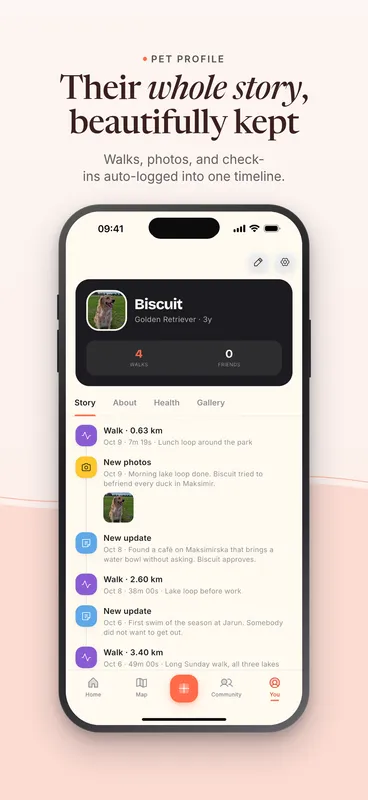
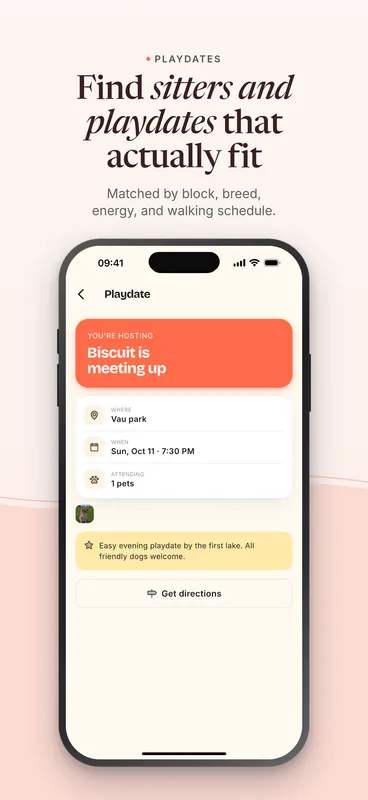
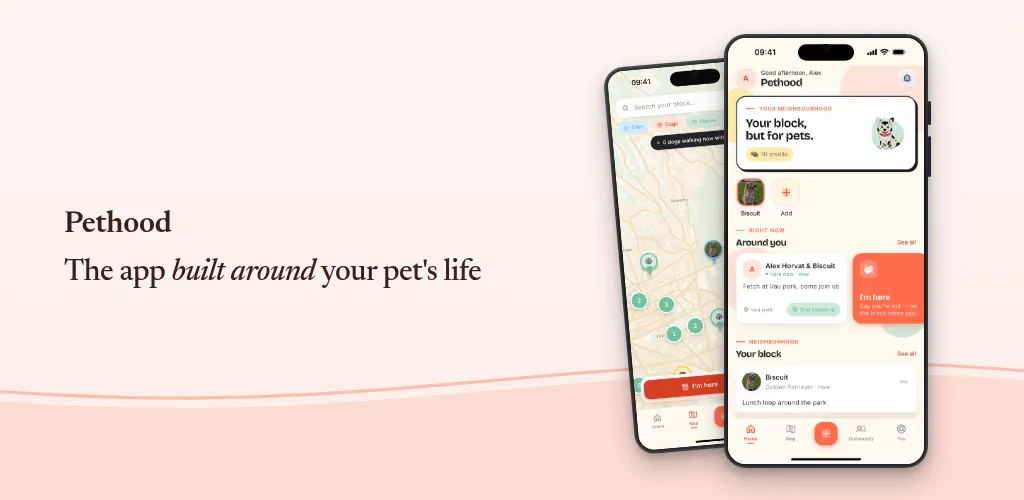
Pethood is our founder's own app. These are unedited Batchcraft exports from its real screenshots.
Frequently asked questions
What is the best App Store screenshot generator?
It depends on the job. For hands-on design, many languages and direct store upload, a dedicated editor such as AppScreens or Screenshots Pro fits. To generate the store set together with paid-social ads and a reel from the same screens, Batchcraft fits.
Do I need a designer for App Store screenshots?
No. Template editors let you design them yourself, and Batchcraft generates them from raw screens with captions written for you. Either way, keep one clear benefit per screenshot and use real UI.
Which sizes do I need?
For the App Store, a 6.9 inch iPhone set (1320x2868) covers current requirements. For Google Play, 2 to 8 phone screenshots plus a 1024x500 feature graphic. Batchcraft exports all three.
How much does Batchcraft cost?
Try 3 free ads with no signup and no card. A free account adds 100 credits (about 50 watermarked statics, since an AI-written static costs 2 credits) plus one reel to try. Paid plans are Starter at $29/mo (700 credits, reels, no watermark), Pro at $99/mo (2,000 credits, 3 brands) and Business at $299/mo (7,000 credits); annual billing gives 2 months free.
See it on your own screens.
Paste your site, or upload phone or desktop screenshots. About two minutes.