Use cases/B2B software ads

Ads for B2B software: POS, CRM, ERP and admin tools

Short answer

Batchcraft makes ads for business software from your real screenshots. Upload screens of your POS, inventory, CRM, ERP or booking system and it builds ads that show the workflow a buyer cares about (the register, the stock table, the report) with a headline for that job, in 1:1, 4:5 and 9:16. Try 3 ads free, no signup.

Business buyers want to see the screen they will use every day. Batchcraft turns your POS, CRM or back-office screens into ads that show exactly that.

How it works

  1. 01

    Upload the screens buyers use

    The register, the stock list, the invoice, the report. Desktop, tablet and phone screens all work, and mixed sets are fine.

  2. 02

    One job per ad

    Batchcraft writes each ad around a single job the screen does, such as ringing up an order or reordering stock, and frames the screen so that part is readable.

  3. 03

    Export and test

    Download every size with the copy, run the set against your audience (for example cafe owners, clinics or wholesalers) and keep the screens that win.

Real before and after examples

Unedited Batchcraft exports. Where a raw screenshot is shown, the ad next to it was made from it.

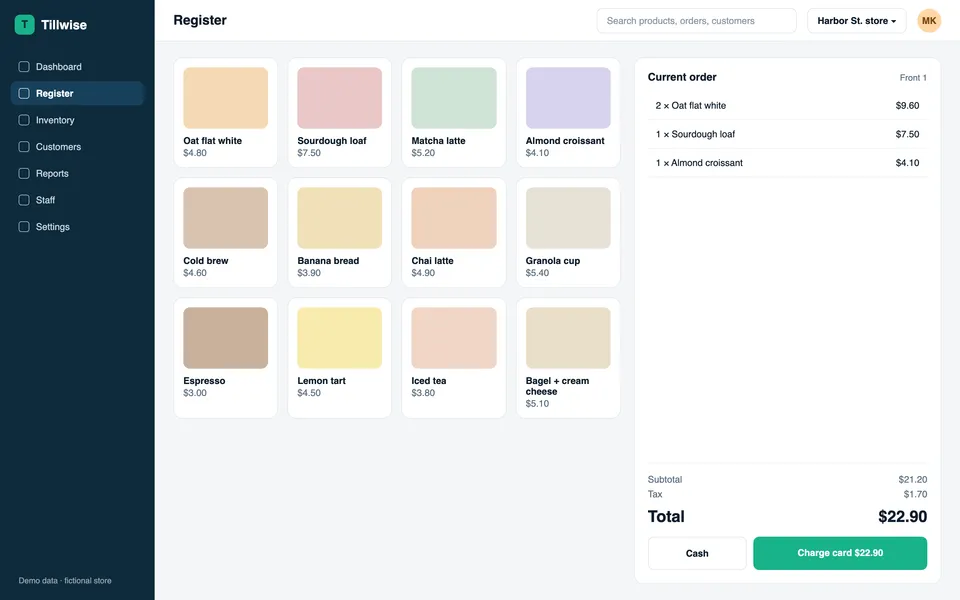
Raw screenshot
Raw screenshot: Tillwise POS register screen and the resulting ad headlined Add items, split payments, and close orders in seconds
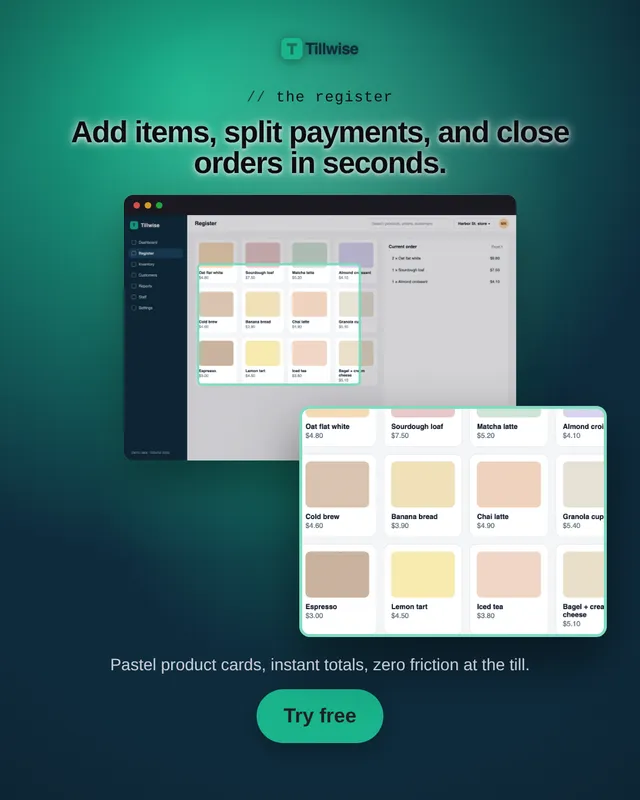
Batchcraft ad
Tillwise POS register screen and the resulting ad headlined Add items, split payments, and close orders in seconds
POS register screen to a 4:5 ad
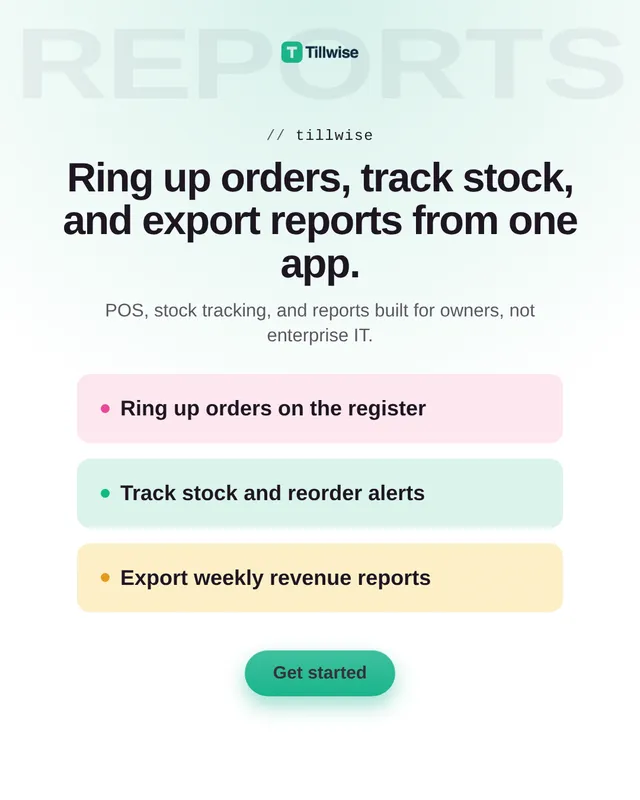
Tillwise ad listing ring up orders, track stock and export weekly revenue reports
A feature-list ad for the whole suite

Tillwise is a fictional demo brand we built to show desktop output. The screens and the ads are real Batchcraft input and output.

One page for every kind of business software

POS and retail systems, inventory and warehouse tools, CRMs, ERPs, booking and clinic software, accounting and invoicing apps: the ad problem is the same. Your product is a dense desktop or tablet screen, your buyer is busy, and the ad has to show the one workflow that makes their day easier.

Batchcraft treats each screen as evidence for one claim. The register screen sells speed at the counter, the stock screen sells never running out, the report screen sells knowing your numbers.

Built for local and niche markets

Much B2B software is sold to a specific trade in a specific country. Tell Batchcraft who the buyer is ("pharmacies in Lahore", "independent cafes in Leeds") and the copy speaks to that buyer, while claims stay limited to what your site and screens support.

Every creative is unique across your account, so you can run several audience variants without shipping duplicates.

When you have no designer

Most B2B software teams are developers and a founder. Batchcraft replaces the design queue for paid social: it sets type, frames screens and keeps the brand consistent, and you approve or ask for changes in plain language.

Pricing

Try 3 free ads with no signup and no card. A free account adds 100 credits (about 50 watermarked statics, since an AI-written static costs 2 credits) plus one reel to try. Paid plans are Starter at $29/mo (700 credits, reels, no watermark), Pro at $99/mo (2,000 credits, 3 brands) and Business at $299/mo (7,000 credits); annual billing gives 2 months free.

See full pricing →

Frequently asked questions

How do I advertise POS or inventory software?

Show the screen the buyer will use: the register for speed, the stock table for reordering, the report for knowing your numbers. Run one ad per job, target the trade you serve, and test which screen gets the cheapest demo or trial. Batchcraft builds those ads from your real screenshots.

Can it make ads in my local market?

Yes. Tell it the audience and place in plain language and the copy is written for that buyer.

Do my screenshots stay private?

Your uploads are stored in your account and used to make your ads. They are not published or shown to other users.

Does Batchcraft change or fake my UI?

No. Your screenshots are placed into the ad as they are, inside a device or browser frame, and are never cropped into something they are not or redrawn by an image model. Zoomed callouts are crops of your real screen. Copy is checked so it does not invent ratings, user counts or other numbers you did not give it.

How much does Batchcraft cost?

Try 3 free ads with no signup and no card. A free account adds 100 credits (about 50 watermarked statics, since an AI-written static costs 2 credits) plus one reel to try. Paid plans are Starter at $29/mo (700 credits, reels, no watermark), Pro at $99/mo (2,000 credits, 3 brands) and Business at $299/mo (7,000 credits); annual billing gives 2 months free.

See your screens as ads.

Paste your site, or upload phone or desktop screenshots. About two minutes.

3 free ads, no signup, no card.