Use cases/App Store screenshots

App Store and Google Play screenshots, done

Short answer

Batchcraft generates App Store and Google Play screenshot sets from your raw app screens. Upload up to 10 screenshots and it writes a caption for each, frames them in iPhone and Android devices, and exports the 6.9 inch App Store size (1320x2868), Google Play phone screenshots (1080x1920) and the 1024x500 Play feature graphic, plus matching app ads in 1:1, 4:5 and 9:16.

The store listing is the last ad before the install. Batchcraft builds the screenshot set and the feature graphic from the same screens as your ads, so the listing matches what people tapped on.

How it works

  1. 01

    Pick your screens

    Choose up to 10 raw screenshots in the order you want them in the store. Screens are never cropped.

  2. 02

    Write or generate captions

    Type an eyebrow, headline and supporting line per screen, or let Batchcraft write them from what each screen shows. Wrap a word in *asterisks* to emphasise it.

  3. 03

    Choose a style and export

    Pick Editorial, Clean or your brand fonts, light, dark or brand-colour backgrounds, iPhone, Android or both, then download one ZIP with every store size, the feature graphic and app ads.

Real before and after examples

Unedited Batchcraft exports. Where a raw screenshot is shown, the ad next to it was made from it.

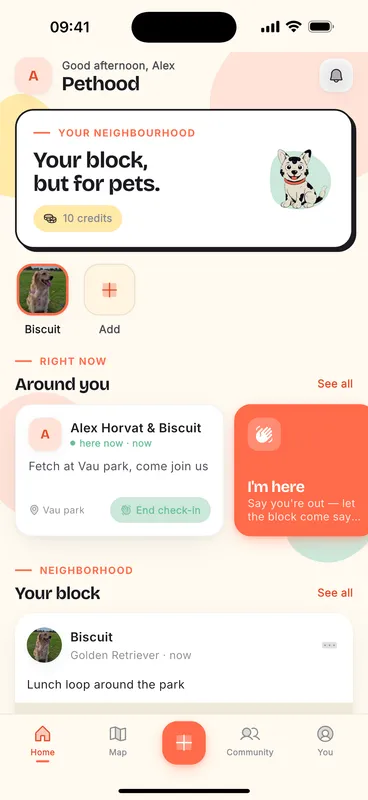
Raw screenshot
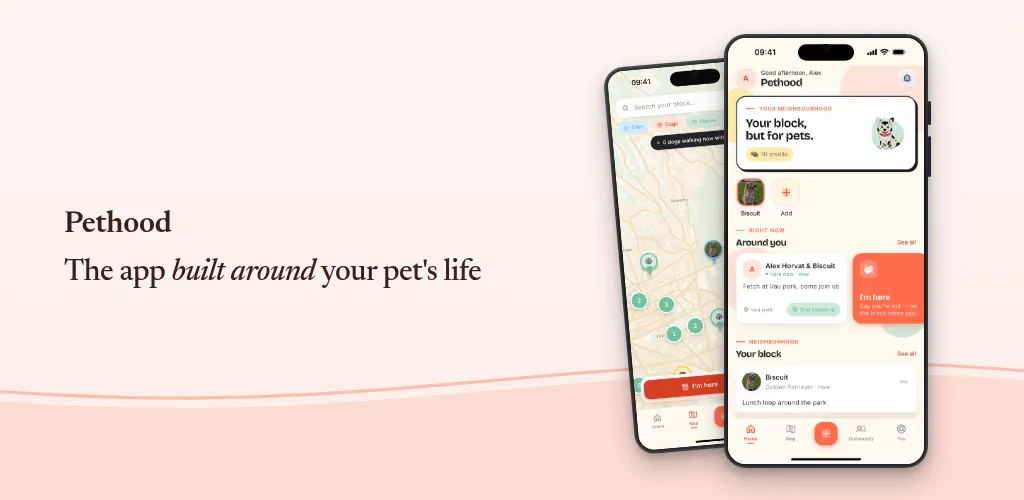
Raw screenshot: Pethood raw home screen and the App Store screenshot with the caption The app built around your pet's life
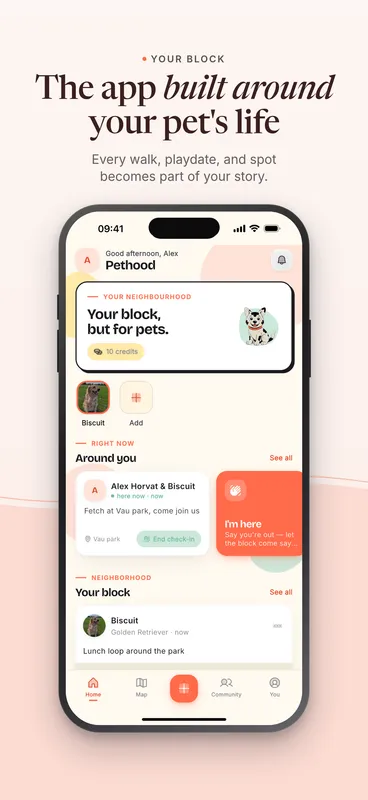
Batchcraft ad
Pethood raw home screen and the App Store screenshot with the caption The app built around your pet's life
Raw screen to App Store 6.9 inch screenshot
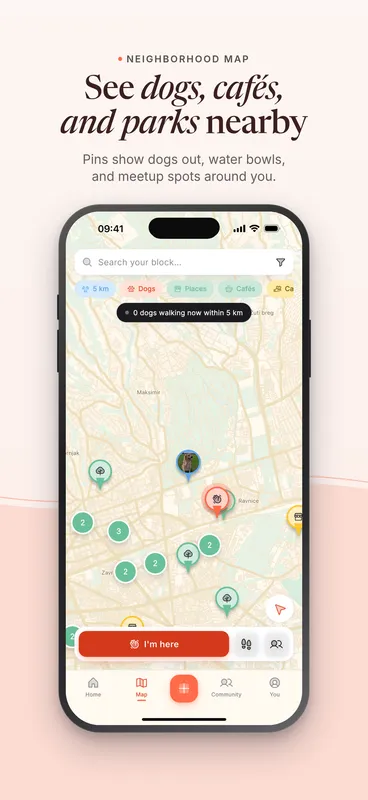
App Store screenshot: See dogs, cafes, and parks nearby
Map screen, App Store
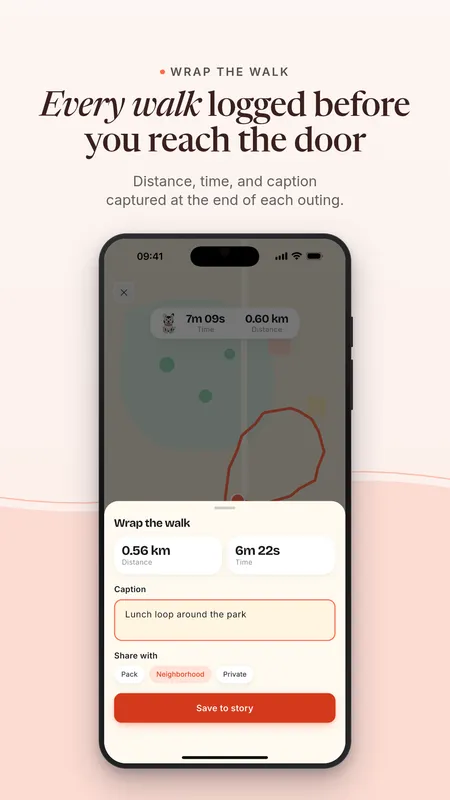
Google Play screenshot: Every walk logged before you reach the door
Google Play phone screenshot
Pethood Google Play feature graphic with two phones
Google Play feature graphic, 1024x500

Pethood is our founder's own app. These are unedited Batchcraft exports from its real screenshots.

What you get in the ZIP

App Store screenshots at 6.9 inch (1320x2868), the size App Store Connect asks for first. Google Play phone screenshots at 1080x1920. The Google Play feature graphic at 1024x500. And app ads built from the same captions in 1:1, 4:5 and 9:16, saved as a campaign so you can turn them into a reel.

A copy file lists every caption, so you can paste them into your listing notes or localise them.

Captions that pass review

Apple and Google both reject unverifiable claims in screenshots. Batchcraft runs every caption through the same ad-policy and brand-safety checks as your ads, so "#1 app" or invented ratings are flagged before you upload.

One source for the listing and the ads

Most teams make store screenshots in one tool and ads in another, and the two drift apart. Here the store set, the feature graphic, the statics and the reel all come from the same screens and brand, so the ad, the listing and the app look like one product.

Pricing

Try 3 free ads with no signup and no card. A free account adds 100 credits (about 50 watermarked statics, since an AI-written static costs 2 credits) plus one reel to try. Paid plans are Starter at $29/mo (700 credits, reels, no watermark), Pro at $99/mo (2,000 credits, 3 brands) and Business at $299/mo (7,000 credits); annual billing gives 2 months free.

See full pricing →

Frequently asked questions

What size are App Store screenshots in 2026?

App Store Connect requires a 6.9 inch iPhone set (1320x2868 portrait, or 1290x2796), and can scale it down for smaller iPhones. You can upload up to 10 screenshots per localisation. Batchcraft exports the 1320x2868 size.

What does Google Play require?

Google Play needs 2 to 8 phone screenshots (Batchcraft exports 1080x1920) and a 1024x500 feature graphic, which Play uses at the top of your listing and in promotions. Both are in the Batchcraft ZIP.

Can Batchcraft write the captions?

Yes. Click Write headlines for me and it writes an eyebrow, headline and supporting line for each screen from what the screen shows. You can edit every word before exporting.

Is the store screenshot feature free?

Store screenshot sets are made in the studio with a free account (sign in required). They do not use ad credits.

How much does Batchcraft cost?

Try 3 free ads with no signup and no card. A free account adds 100 credits (about 50 watermarked statics, since an AI-written static costs 2 credits) plus one reel to try. Paid plans are Starter at $29/mo (700 credits, reels, no watermark), Pro at $99/mo (2,000 credits, 3 brands) and Business at $299/mo (7,000 credits); annual billing gives 2 months free.

See your screens as ads.

Paste your site, or upload phone or desktop screenshots. About two minutes.

3 free ads, no signup, no card.