Batchcraft vs Canva for app ads
Use Canva if you want to design each app ad by hand from a template and also need decks, posts and documents. Use Batchcraft if you want a finished set of app ads from your screenshots without laying them out: it frames each screen, writes the headline, exports 1:1, 4:5 and 9:16 plus a reel, and builds App Store and Play screenshots from the same screens.
Both can get you an app ad. The difference is who does the layout: you, in Canva's editor, or Batchcraft's agent, from your screenshots.
Canva is an excellent general design editor. For app ads you would start from a template, drop your screenshot into a phone mockup, write the headline, then resize the design for each placement. It is flexible and you control every pixel, and it also covers your decks, social posts and docs.
Batchcraft does one job: turning app and web app screens into paid-social ads. You upload screens (or paste your site) and it composes a batch: each screen framed in a phone or browser, a zoomed callout where the detail matters, a headline written for that screen, all three ad sizes, and a reel. The same screens also produce your App Store and Google Play screenshot set and feature graphic.
The trade-off is control versus speed. In Canva you can make anything, one design at a time. In Batchcraft you steer in plain language ("lead with the map", "for agency owners") and approve, and it handles layout, sizing and copy checks.
Batchcraft vs Canva for app ads, side by side
| Capability | Batchcraft | Canva |
|---|---|---|
| Starting point | Your screenshots or website | A template or blank canvas |
| Who lays out each ad | The agent, per screen | You, in the editor |
| Headlines written from each screen | ✓ Yes | You write them (AI writing tools available) |
| Desktop dashboards with zoomed callouts | ✓ Yes | Manual crops |
| 1:1, 4:5 and 9:16 from one set | Automatic | Resize per design |
| Reel with voiceover from the same screens | ✓ Yes | Manual in the video editor |
| App Store and Play screenshots + feature graphic | Generated from the same screens | Templates you fill in |
| Claim and ad-policy checks on copy | ✓ Yes | No |
| Decks, docs, print and general design | No | ✓ Yes |
| Free to start | 3 ads without signup, then 100 credits | Free plan |
Competitor facts and pricing summarised from public pricing pages as of mid-2026; details change, so check each vendor's site for the latest.
Founders who enjoy designing, want pixel control over a few ads, or need one tool for ads, decks, social posts and documents.
App and SaaS founders who want a finished, on-brand set of ads, a reel and store screenshots from their screens in minutes, and would rather approve than lay out.
Pricing, honestly
Canva has a free plan and paid Pro and Teams subscriptions billed per person; it is a general design subscription rather than a credit-metered ad tool. Batchcraft lets you see 3 ads without signing up, then gives 100 free credits; paid plans are $29, $99 and $299 a month.
See full Batchcraft pricing →What Batchcraft output looks like
Unedited Batchcraft exports. Where a raw screenshot is shown, the ad next to it was made from it.
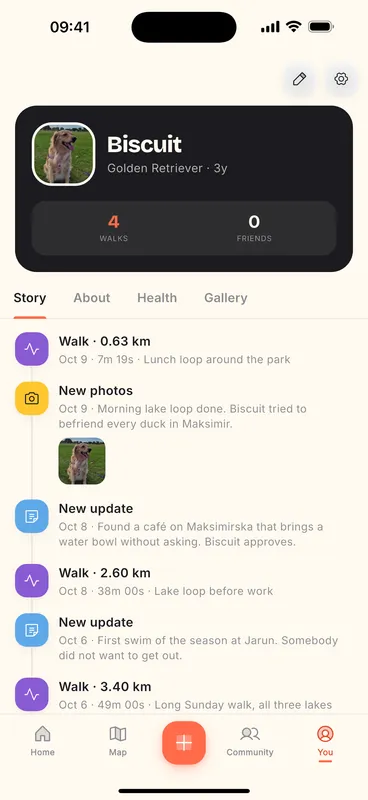
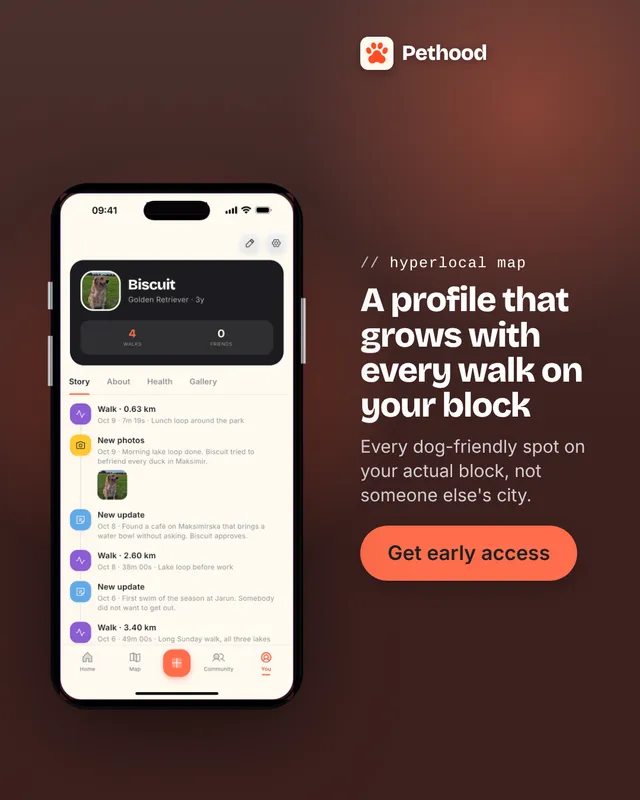
Pethood is our founder's own app. These are unedited Batchcraft exports from its real screenshots.
Frequently asked questions
Is Canva good for app ads?
Yes, if you are happy to design them. Canva has phone mockup templates and resize tools, and you control every detail. It takes more time per ad than a generator because you lay out and size each design yourself.
Is Batchcraft a Canva alternative?
For app and SaaS ads specifically, yes: it produces the ads, a reel and store screenshots from your screens automatically. It is not a general design editor, so it does not replace Canva for decks, documents or print.
Can I edit Batchcraft ads in Canva?
You can download the PNGs and place them in any editor, but Batchcraft is designed so you change ads by asking (for example "bigger headline" or "use the map screen") rather than editing layers.
How much does Batchcraft cost?
Try 3 free ads with no signup and no card. A free account adds 100 credits (about 50 watermarked statics, since an AI-written static costs 2 credits) plus one reel to try. Paid plans are Starter at $29/mo (700 credits, reels, no watermark), Pro at $99/mo (2,000 credits, 3 brands) and Business at $299/mo (7,000 credits); annual billing gives 2 months free.
See it on your own screens.
Paste your site, or upload phone or desktop screenshots. About two minutes.